

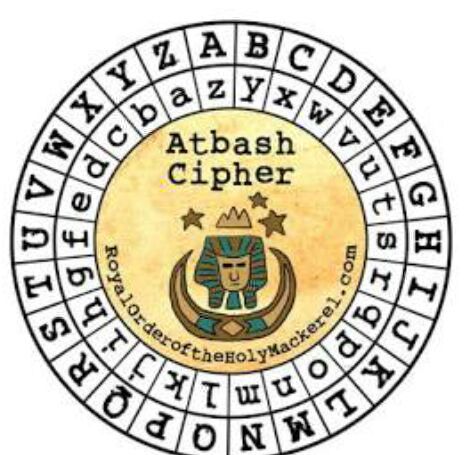
Description: How about some hide and seek heh? Look at this image here.
Difficulty: Medium
Author: Sunday Jacob Nwanyim
Summary
This challenge combines two concepts: image steganography (using steghide) and the Atbash cipher. The goal is to extract hidden data from a JPEG image and decode it using Atbash.
Analysis
We are provided with a file named atbash.jpg:
$ file atbash.jpgatbash.jpg: JPEG image data, JFIF standard 1.01, aspect ratio, density 1x1, segment length 16, baseline, precision 8, 465x455, components 3So the file is a normal JPEG image:

Step 1: Extracting Hidden Data
The most common steganography tool for JPEGs is steghide, which can hide text or files inside images.
$ steghide atbash.jpgwrote extracted data to "encrypted.txt".This gives us a new file:
$ cat encrypted.txtkrxlXGU{zgyzhs_xizxp_8z0uvwwx}So the hidden message inside the JPEG is:
krxlXGU{zgyzhs_xizxp_8z0uvwwx}It clearly looks like a flag, but encoded.
Step 2: Understanding Atbash
What is atbash cipher ?
Atbash is a monoalphabetic substitution cipher where every letter is mapped to its “reverse”:
- A ↔ Z
- B ↔ Y
- C ↔ X
- …
- M ↔ N
It applies only to alphabetic characters, numbers, braces, underscores, etc., remain unchanged. So to decode, we simply reverse each letter using the Atbash mapping.
Step 3: Manually Decoding the String
Let’s decode it character by character.
- k →
p - r →
i - x →
c - l →
o - X →
C - G →
T - U →
F
So:
krxlXGU → picoCTFContinuing the Atbash mapping over the rest of the string gives : picoCTF{atbash_crack_8a0feddc}
Manual decoding works, but to speed things up we can also use an online tool such as the Atbash Decoder
⚡ Raikiri🎉 Flag pwned!

Final flag : picoCTF{atbash_crack_8a0feddc}
💡 TL;DR / Lesson LearnedThis challenge shows how to extract hidden data from a JPEG using steghide and decode it using the Atbash cipher, revealing the final flag.